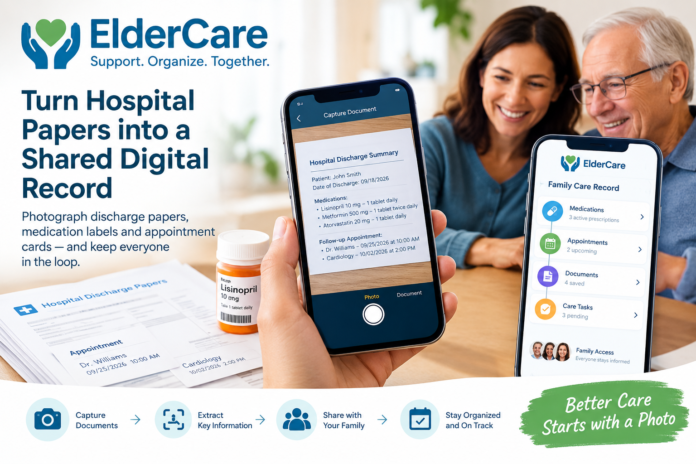
LINCOLNTON, Ga. – Sept. 20, 2026 – ElderCare has introduced a new family care tool designed to make the transition from hospital to home easier for caregivers. The platform allows families to photograph hospital discharge documents, medication labels, and appointment cards and turn that information into a shared digital care record.
The new feature is designed for the often-hectic period immediately after a patient returns home. Instead of asking one family member to manually enter information from a stack of paperwork, caregivers can capture the documents with a smartphone and organize the information in one accessible place.
Turning Paperwork Into a Shared Digital Record
Hospital discharge packets can contain several types of important information, including medication instructions, follow-up appointments, discharge summaries, and handwritten notes. Sharing those details among multiple relatives can be difficult, particularly when family members live in different locations.
ElderCare’s photo-based capture process provides a simpler way to organize these documents. Users can photograph a page or medication label, after which the service extracts relevant information and displays it alongside the original image.
The information is not automatically added to the family’s care timeline. A person must review and confirm the extracted details first, allowing family members to compare the digital information with the original document.
The platform is designed as a family organization and record-keeping tool rather than a medical service. It does not diagnose medical conditions, prescribe treatments, or determine whether a medication should be taken.
“Discharge is when the paperwork multiplies and the family still has to drive home,” said Chris Paulus, founder of ElderCare. “We are not replacing a doctor. We are giving the household one place to put what the hospital already printed, so a brother in another city can see the same list.”
Helping Families Stay Organized
Once information is confirmed, it can be organized within a shared family timeline. Caregivers can use the timeline to keep track of upcoming appointments, medication-related information, refills, transportation responsibilities, and important documents.
The system is intended to reduce the need to search through camera-roll photos, text messages, or physical paperwork when another family member needs an update.
Families can also store relevant documents in a digital vault, giving authorized relatives and helpers a centralized place to find care-related records.
Family Access and Pricing
ElderCare offers a family license for $99 as a one-time payment. Relatives and caregivers invited to participate in the same family account do not need to purchase separate licenses.
Families can begin using the initial capture functionality without entering payment information. Filed information remains readable even if the family does not purchase a license, although additional captures are stopped when an active license is not purchased.
The service is built around human confirmation, meaning extracted information is presented for review rather than being treated as automatically verified medical information.
Frequently Asked Questions
1. What is ElderCare?
ElderCare is a family care-record platform that helps households organize information from hospital discharge documents, medication labels, appointment cards, and other care-related paperwork.
2. How does the photo-based capture feature work?
A family member uses a smartphone to photograph a discharge paper, medication label, or appointment card. ElderCare extracts relevant information and displays it alongside the original image for review.
3. Does ElderCare automatically add information to the family record?
No. A person must review and confirm the extracted information before it is added to the family’s timeline.
4. Can multiple family members access the same information?
Yes. Families can invite relatives and helpers to share access to the family’s care record, allowing authorized participants to view the same information.
5. Does ElderCare provide medical advice?
No. ElderCare is designed for organizing family care information. It does not diagnose medical conditions, prescribe medications, or determine whether a medication should be taken.
6. What types of documents can families capture?
The service is designed for documents such as hospital discharge papers, medication labels, prescription information, appointment cards, and handwritten care notes.
7. Can families keep the original document images?
Yes. Extracted information is kept alongside the original source photo so family members can review the information against the document they photographed.
8. How much does ElderCare cost?
The family license costs $99 as a one-time payment. Invited relatives and helpers do not need to purchase individual licenses.
9. Can a family try ElderCare before purchasing?
Families can begin the initial capture process without entering payment information. Additional captures require a purchased license.
10. Where can families learn more?
Families can learn more about the service at ElderCare.website.
About ElderCare
ElderCare App is a family care-record service based in Lincolnton, Georgia. The platform converts photographs of discharge papers, medication labels, and appointment cards into an organized shared timeline. ElderCare is designed to help families organize care information and does not provide medical advice.

