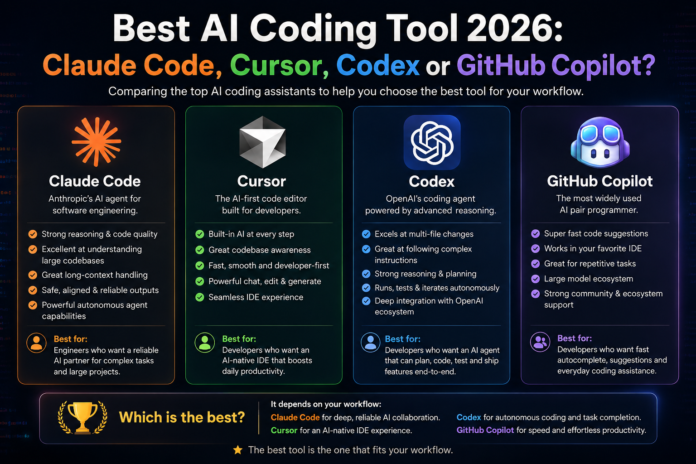
Summary: After six months of rigorous testing, Claude Code, Cursor, Codex, and GitHub Copilot all show the same core limitations: they frequently over-engineer solutions and require expert human oversight. Claude Code stands out for its superior context handling, yet 43% of AI-generated changes still need debugging. Real success depends on developer skill, disciplined processes like tight TDD loops, and strong code review — not just adopting the latest tool.
Every vendor in the AI coding space promises the same three things: autonomous, productive, and accessible. After extensive real-world testing of the four leading tools on identical workflows, only one of those claims consistently proves true.
The Four Major Players
Four tools currently dominate the AI coding conversation:
- Claude Code — Best for complex, multi-file planning and terminal-heavy workflows.
- Codex — The top fire-and-forget choice for big, sandboxed refactors.
- GitHub Copilot — The enterprise winner for teams already committed to GitHub.
- Cursor — Strong for IDE-based model switching, but adds noticeable UI clutter.
Recent analysis suggests Claude Code alone may already account for roughly 4% of new code on GitHub, with projections reaching 20% by the end of the year. Yet the question “Which one is best?” is the wrong one to ask.
What truly matters is how your developers actually work and whether they can reliably distinguish good code from bad. Without that foundation, these tools don’t fix problems — they amplify them. That lesson comes from 25 years of experience in software development.
Testing Methodology
At Fusion Collective, we tested each tool using the same strict test-driven development (TDD) process we apply to human-written code: start with requirements, write tests, generate implementation, run tests, and iterate until everything passes.
This methodology is powerful because it forces the AI to commit to “done.” The tests serve as an objective contract — the code either passes or it fails. There’s no room for vague explanations.
Unlike vendor benchmarks that test isolated tasks in perfect conditions, our TDD-based evaluation measures whether a tool genuinely shortens the path from requirement to reliable, working code in a real codebase.
Industry reports paint a sobering picture. The DORA 2025 report shows AI adoption near 90%, yet roughly 30% of developers report little to no trust in the generated code. Lightrun’s 2026 survey found that 43% of AI-generated changes require debugging in production, and zero engineering leaders described themselves as “very confident” in their AI code. Adoption and trust are clearly not the same thing.
Claude Code
Claude Code is Anthropic’s command-line coding agent. It runs in the terminal alongside your existing workspace and leverages Claude models with a massive 1M-token context window, allowing it to keep most codebases in memory.
Pros:
- Strongest contextual awareness across entire codebases among the four tools.
- Proactively asks clarifying questions before coding.
- Excellent at coordinating multiple AI agents in parallel.
- Significantly more token-efficient (independent tests showed ~5.5x fewer tokens than Cursor on similar tasks).
Best for: Large refactors, multi-file features, or any work where planning is as important as implementation.
Cons:
- Can occasionally pursue adjacent problems not requested by the user (“wild goose chases”).
- Reliability has been an issue — Anthropic’s April 23 postmortem detailed infrastructure bugs that caused accuracy on Opus 4.6 to drop from 83.3% to 68.3% over six weeks. Teams should anticipate occasional quality drift and review accordingly.
Codex
Codex is OpenAI’s sandboxed coding solution. It operates in a separate cloud workspace with no direct access to your local machine, making it ideal for true hand-off scenarios.
Pros:
- Excels at large, autonomous, multi-step tasks like complex refactoring.
- Strongest “fire-and-forget” capability — assign a task and review later.
- Easy integration for teams already heavily using OpenAI services.
Best for: Big, well-defined projects where you want the AI to work independently before you review the results.
Cons:
- Prone to over-engineering the further it moves from your last review point.
- Course correction becomes harder once the AI has gone deep into its own path.
Cursor
Cursor is the only full IDE in this comparison — a fork of VS Code, making it immediately familiar to most developers.
Pros:
- Hybrid model access: uses its own model plus direct pass-through to Claude and OpenAI models.
- Allows seamless switching between providers within the same interface without new accounts or tools.
- Ideal when one vendor experiences downtime or regressions.
Best for: Developers who want to stay inside a polished IDE and maintain flexibility across model providers.
Cons:
- Doesn’t lead in planning (Claude Code), autonomy (Codex), or raw generation.
- UI clutter from status bars, side panels, and agent indicators disrupts clean workflows.
- Past credit system changes led to unexpected billing overages for heavy users.
GitHub Copilot
GitHub Copilot is GitHub’s dedicated AI coding assistant (distinct from Microsoft Copilot, despite the shared parent company).
Pros:
- Native, deep integration for organizations already on GitHub Enterprise.
- Centralized security, billing, and compliance.
- Supports multi-model routing.
Best for: Large teams where procurement, governance, and GitHub standardization are priorities.
Cons:
- Largely acts as a wrapper around other vendors’ models, inheriting their issues and occasional version lag.
- The decision is mostly administrative: if you’re already all-in on GitHub Enterprise, it’s the easiest path.
Final Verdict
On pure code generation quality, the four tools perform similarly. The meaningful differences lie in planning depth, autonomous capability, vendor stability, and fit with your existing environment.
Common issues across all tools:
- Over-engineering and scope creep.
- Unintended edits to previously working code.
- Risk of regressions slipping into the codebase.
Speed is the most misleading metric — it fluctuates with server load more than model quality. All four tools have shipped notable regressions in the past 12 months.
How to Choose an AI Coding Tool
Trial cost is low for all options, so experimentation is easy.
- Solo developers: Claude Code is often the cleanest and most consistent choice across languages and project types.
- Small teams: Claude Code or Codex, depending on your IDE preference (we favor PyCharm + terminal tools) and existing provider relationships.
- Large GitHub Enterprise organizations: Copilot wins on procurement and management.
- Cursor: Only if IDE integration and frequent model switching are critical; many teams find the added clutter not worth it for daily work.
Advice for Developers
Claude Code and Codex are natively agentic. Success requires more than good prompting — you need to know how to break problems into manageable agent tasks.
Key discipline: Keep scope tight. Review output every few iterations, use precise prompts (include signatures, inputs, outputs, and constraints), and treat the AI like an overzealous but talented intern.
Advice for Leadership
Evaluate tools based on your needs 18 months from now, not just today. Document decisions thoroughly so you can pivot during the inevitable vendor churn or pricing changes.
Maintain clear, transparent AI policies rather than allowing undocumented shadow usage. Remember: AI doesn’t fix teams — it amplifies them. Weak review processes and unclear ownership will produce worse outcomes with AI, not better.
The future belongs to teams that combine powerful AI tools with strong engineering judgment, disciplined processes, and rigorous oversight.

