Introduction
Cybersecurity has become one of the biggest concerns for businesses of all sizes. Whether you operate a small local company or a multinational organisation, cybercriminals are constantly looking for vulnerabilities they can exploit. Data breaches, ransomware attacks, phishing scams, and malware infections can cause severe financial losses, damage a company’s reputation, and disrupt daily operations.
As businesses become increasingly dependent on digital technologies, cloud computing, remote working, and online transactions, the need for strong cybersecurity measures has never been greater. Unfortunately, many organisations still believe they are too small to become a target. In reality, small and medium-sized businesses are among the most frequently attacked because they often lack advanced security systems.
Cybersecurity is no longer just an IT responsibility. Every employee, manager, and business owner plays a role in protecting sensitive information and maintaining a secure working environment. A single weak password or careless click on a phishing email can lead to devastating consequences.
Fortunately, reducing cyber risks doesn’t always require expensive technology. By implementing practical security measures and educating employees, businesses can significantly strengthen their defences against modern cyber threats.
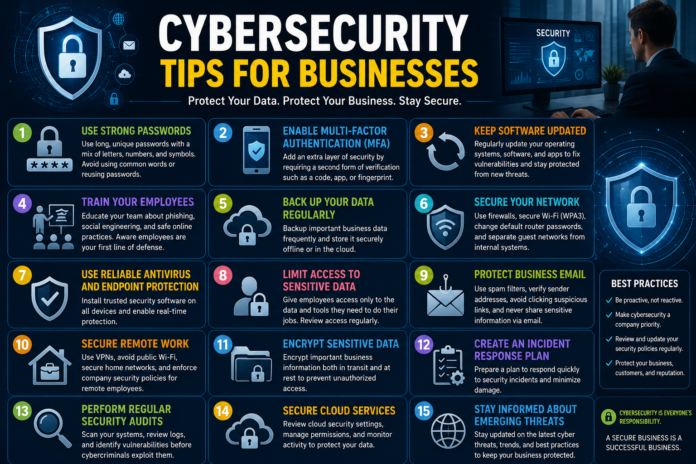
In this comprehensive guide, we’ll explore 15 essential cybersecurity tips every business should follow to protect their systems, customers, and valuable data.
Why Cybersecurity Is Important for Businesses
Cyberattacks have become more sophisticated than ever before. Criminals use automated tools, artificial intelligence, and social engineering techniques to identify weaknesses in company networks.
A successful cyberattack can result in:
- Financial losses
- Data theft
- Operational downtime
- Regulatory penalties
- Identity theft
- Loss of customer trust
- Damage to brand reputation
- Legal complications
Strong cybersecurity practices help businesses minimise these risks while ensuring business continuity.
Common Cyber Threats Businesses Face
Before implementing security measures, it’s important to understand the most common threats.
Phishing Attacks
Cybercriminals send fake emails pretending to be trusted organisations to steal passwords, banking details, or confidential information.
Malware
Malicious software infects computers and can steal data, monitor activity, or damage systems.
Ransomware
Attackers encrypt business files and demand payment in exchange for restoring access.
Insider Threats
Employees or contractors may intentionally or accidentally expose sensitive information.
Password Attacks
Weak or reused passwords allow hackers to gain unauthorised access to business accounts.
Data Breaches
Sensitive customer or company information may be stolen due to inadequate security controls.
Understanding these threats helps organisations prioritise their cybersecurity efforts.
Tip 1: Use Strong and Unique Passwords
Passwords remain the first line of defence against cybercriminals.
Unfortunately, many businesses still rely on weak passwords such as:
- 123456
- password
- companyname123
- admin
These passwords can often be cracked within seconds using automated software.
Instead, every employee should create passwords that include:
- Uppercase letters
- Lowercase letters
- Numbers
- Special characters
Passwords should also be at least 12 to 16 characters long and unique for every account.
Businesses should encourage staff to use reputable password managers to generate and securely store complex passwords.
Strong password policies significantly reduce the likelihood of unauthorised access.
Tip 2: Enable Multi-Factor Authentication (MFA)
Even strong passwords can sometimes be compromised.
Multi-Factor Authentication (MFA) adds an additional layer of security by requiring users to verify their identity using two or more authentication methods.
Common authentication methods include:
- Passwords
- Mobile authentication apps
- Fingerprints
- Face recognition
- Security keys
- One-time verification codes
If a hacker steals a password, they still cannot access the account without the second verification method.
Businesses should enable MFA on:
- Email accounts
- Banking platforms
- Cloud storage
- Customer management systems
- Accounting software
- Administrative accounts
MFA is one of the simplest and most effective cybersecurity improvements any organisation can implement.
Tip 3: Keep Software and Operating Systems Updated
Outdated software is one of the easiest ways for cybercriminals to gain access to business systems.
Software developers regularly release updates that fix newly discovered security vulnerabilities.
Unfortunately, many businesses delay installing updates, leaving systems exposed.
Regularly update:
- Operating systems
- Antivirus software
- Firewalls
- Web browsers
- Office applications
- Business software
- Mobile devices
Whenever possible, enable automatic updates to ensure critical security patches are installed promptly.
Keeping software up to date significantly reduces the risk of exploitation.
Tip 4: Train Employees to Recognise Cyber Threats
Technology alone cannot stop cyberattacks.
Human error remains one of the leading causes of security breaches.
Employees should receive regular cybersecurity awareness training covering topics such as:
- Phishing emails
- Fake websites
- Social engineering
- Password security
- Safe internet browsing
- Secure file sharing
- Remote working security
Training should include real-world examples and simulated phishing exercises to help employees recognise suspicious activity.
Encouraging staff to report unusual emails or system behaviour immediately can prevent small incidents from becoming major security breaches.
Cybersecurity awareness should become part of the company culture rather than a one-time training session.
Tip 5: Back Up Business Data Regularly
No security system is completely immune to cyberattacks.
Regular backups ensure businesses can recover quickly following ransomware attacks, accidental deletions, hardware failures, or natural disasters.
An effective backup strategy should include:
- Daily backups
- Automatic backups
- Cloud backups
- Offline backups
- Encrypted backups
- Regular backup testing
Many organisations follow the 3-2-1 backup rule:
- Keep three copies of your data.
- Store data on two different types of media.
- Keep one copy stored off-site or in the cloud.
Businesses should also test backups regularly to ensure files can be restored successfully when needed.
Reliable backups dramatically reduce downtime and minimise financial losses after a cyber incident.
Building a Security-First Culture
Cybersecurity is not simply about installing software—it is about creating a culture where every employee understands their responsibility.
Business leaders should:
- Encourage employees to report suspicious activity.
- Develop clear cybersecurity policies.
- Regularly review security procedures.
- Reward good security practices.
- Conduct periodic security audits.
A proactive security culture helps identify vulnerabilities before attackers can exploit them.
.
Tip 6: Secure Your Business Network
Your business network is the backbone of your digital operations. If attackers gain access to your network, they may be able to steal sensitive information, monitor communications, or disrupt business activities.
To improve network security:
- Use enterprise-grade firewalls.
- Change default router usernames and passwords.
- Encrypt wireless networks with WPA3 or WPA2.
- Hide your Wi-Fi network when appropriate.
- Separate guest Wi-Fi from internal business networks.
- Disable unused network services.
- Regularly review connected devices.
Businesses should also monitor network traffic for unusual behaviour that could indicate an attempted cyberattack.
A well-secured network makes it much more difficult for hackers to move through your systems.
Tip 7: Install Reliable Antivirus and Endpoint Protection
Every laptop, desktop computer, smartphone, and tablet connected to your business network represents a potential entry point for cybercriminals.
Modern endpoint protection software does much more than detect viruses.
Advanced security solutions can:
- Detect ransomware
- Block malware
- Prevent spyware
- Monitor suspicious behaviour
- Stop malicious downloads
- Identify zero-day threats
Businesses should install trusted security software on every device used by employees.
Automatic updates should always remain enabled so new threats are recognised immediately.
Endpoint Detection and Response (EDR) solutions provide even greater visibility by continuously monitoring devices for suspicious activity.
Tip 8: Limit User Access to Sensitive Information
Not every employee needs access to every business system.
Following the Principle of Least Privilege (PoLP) reduces the damage that can occur if an account becomes compromised.
Employees should only receive access to:
- Files required for their role
- Necessary software
- Department-specific information
- Approved business applications
Administrative privileges should be restricted to authorised personnel only.
Businesses should also:
- Remove inactive accounts.
- Disable former employee access immediately.
- Review user permissions regularly.
- Monitor privileged accounts.
Access control is one of the most effective ways to reduce insider threats and minimise data exposure.
Tip 9: Protect Business Email Accounts
Email remains the most common method used by cybercriminals to target businesses.
Attackers often impersonate trusted organisations to trick employees into revealing passwords, transferring money, or downloading malicious files.
To improve email security:
- Enable spam filtering.
- Use phishing protection.
- Block suspicious attachments.
- Verify sender addresses carefully.
- Avoid clicking unknown links.
- Use email authentication protocols.
- Require MFA for email accounts.
Employees should always confirm unusual payment requests through a separate communication method before taking action.
A few extra seconds of verification can prevent costly financial fraud.
Tip 10: Secure Remote Work Environments
Remote and hybrid working have become common across many industries.
While flexible working offers many advantages, it also introduces additional cybersecurity risks.
Businesses should establish clear remote working policies that include:
Use Secure VPN Connections
Virtual Private Networks encrypt internet traffic, making it much harder for attackers to intercept sensitive information.
Avoid Public Wi-Fi
Employees should never access confidential company systems using unsecured public wireless networks unless connected through a secure VPN.
Secure Home Networks
Staff should update home router passwords and install firmware updates regularly.
Use Company-Approved Devices
Whenever possible, employees should work on company-managed devices protected by security software and device management policies.
Lock Devices
Automatic screen locking helps prevent unauthorised access if devices are left unattended.
Remote workers should receive the same cybersecurity training as office-based employees.
Why Businesses Need Multiple Layers of Security
Cybersecurity is most effective when several protective measures work together.
A strong security strategy typically includes:
- Firewalls
- Antivirus software
- Multi-factor authentication
- Employee awareness training
- Data encryption
- Secure backups
- Network monitoring
- Access controls
- Security policies
- Incident response planning
If one layer fails, the remaining defences continue protecting business systems.
This “defence in depth” approach greatly improves overall security.
Developing a Cybersecurity Policy
Every business should have a written cybersecurity policy that outlines expectations for employees and contractors.
The policy should include:
- Password requirements
- Device security rules
- Internet usage guidelines
- Email security practices
- Remote working procedures
- Data protection policies
- Incident reporting procedures
- Software installation rules
- Backup responsibilities
Reviewing and updating the policy annually helps organisations adapt to evolving cyber threats.
Monitoring Your Security
Cybersecurity is not a one-time project.
Businesses should continuously monitor their systems by:
- Reviewing security logs.
- Monitoring login attempts.
- Scanning for vulnerabilities.
- Performing penetration testing.
- Auditing user permissions.
- Updating security software.
Regular monitoring enables businesses to identify suspicious behaviour before serious damage occurs.
The Financial Cost of Cybercrime
Many businesses underestimate the financial impact of cyberattacks.
A successful attack may lead to:
- Lost revenue
- Legal expenses
- Regulatory fines
- Customer compensation
- Recovery costs
- System repairs
- Reputation damage
- Business interruption
Investing in preventive cybersecurity measures is significantly more affordable than recovering from a major security breach.
Creating a Cybersecurity-Aware Workforce
Employees are often described as the first line of defence against cybercrime.
Businesses should encourage staff to:
- Report suspicious emails immediately.
- Question unusual requests.
- Use strong passwords.
- Protect company devices.
- Follow company security policies.
- Participate in regular training sessions.
Creating an open security culture allows employees to report potential problems without fear of blame, helping organisations respond quickly to emerging threats.
15 Cybersecurity Tips Every Business Should Follow (Part 3)
In the first two parts of this guide, we discussed ten essential cybersecurity practices that every business should implement. In this final section, we’ll cover the remaining five tips, explore emerging cybersecurity trends, answer frequently asked questions, and provide SEO-ready metadata for your article.
Tip 11: Encrypt Sensitive Business Data
Data encryption is one of the most effective ways to protect confidential information from unauthorised access.
Encryption converts readable information into coded data that can only be accessed using the correct decryption key.
Businesses should encrypt:
- Customer information
- Employee records
- Financial documents
- Business contracts
- Emails
- Cloud storage
- Portable storage devices
- Backup files
Even if hackers manage to steal encrypted data, they cannot easily read or use it.
Encryption should be applied both to data stored on devices (data at rest) and data transmitted over the internet (data in transit).
Tip 12: Create an Incident Response Plan
No business can completely eliminate cyber risks.
For this reason, every organisation should have a well-documented incident response plan.
An effective plan should define:
- Who responds to security incidents
- How systems will be isolated
- How evidence will be preserved
- How customers will be notified
- Recovery procedures
- Communication strategies
- Legal reporting requirements
Employees should know exactly what to do if they suspect a cyberattack.
Regular incident response drills help businesses react quickly and reduce the impact of security breaches.
Tip 13: Perform Regular Security Audits
Cybersecurity should be reviewed continuously rather than only after an incident occurs.
Regular security audits help businesses identify weaknesses before attackers exploit them.
Audits should examine:
- Password policies
- Network security
- User permissions
- Software updates
- Firewall configurations
- Cloud security
- Backup systems
- Device management
Businesses may also perform vulnerability scans and penetration tests to simulate real-world attacks.
Addressing identified vulnerabilities promptly greatly strengthens overall security.
Tip 14: Secure Cloud Services
Cloud computing has become essential for modern businesses, but it also introduces new security challenges.
To protect cloud-based data:
- Enable multi-factor authentication.
- Encrypt sensitive information.
- Limit administrator access.
- Review sharing permissions.
- Monitor login activity.
- Use trusted cloud providers.
- Remove inactive accounts.
Businesses should also understand the shared responsibility model, where both the cloud provider and the customer have important security responsibilities.
Proper cloud security reduces the risk of unauthorised access and accidental data exposure.
Tip 15: Stay Informed About Emerging Cyber Threats
Cybersecurity is constantly evolving.
Attackers continuously develop new techniques to bypass security controls.
Business leaders should stay informed by:
- Following cybersecurity news
- Subscribing to threat intelligence updates
- Attending cybersecurity webinars
- Training employees regularly
- Reviewing government security guidance
- Updating company security policies
Remaining informed allows businesses to respond quickly to new risks before they become major problems.
A proactive approach is far more effective than reacting after an attack has already occurred.
Building a Long-Term Cybersecurity Strategy
Cybersecurity should support long-term business growth rather than simply responding to individual threats.
A comprehensive security strategy includes:
Risk Assessment
Identify the systems, data, and processes most critical to business operations.
Security Policies
Develop clear guidelines covering acceptable use, password management, remote work, and data protection.
Employee Training
Provide ongoing cybersecurity awareness training rather than one-off sessions.
Technology Investments
Implement reliable security software, firewalls, endpoint protection, and monitoring tools.
Continuous Improvement
Review and improve cybersecurity practices as technology and threats evolve.
Emerging Cybersecurity Trends in 2026
Technology continues to reshape cybersecurity.
Some important trends include:
Artificial Intelligence in Cybersecurity
AI-powered security tools detect suspicious behaviour more quickly than traditional software, helping businesses respond to threats in real time.
Zero Trust Security
The Zero Trust model assumes that no user or device should be trusted automatically. Every access request must be verified before permission is granted.
Passwordless Authentication
Biometric authentication, security keys, and passkeys are gradually replacing traditional passwords, reducing the risk of password-related attacks.
Cloud-Native Security
As more organisations move to cloud platforms, cloud security solutions are becoming increasingly sophisticated.
Managed Security Services
Many small businesses now outsource cybersecurity monitoring to specialist providers who offer round-the-clock protection.
Benefits of Strong Cybersecurity
Investing in cybersecurity offers numerous long-term advantages.
Businesses benefit from:
- Reduced financial losses
- Improved customer trust
- Better regulatory compliance
- Reduced downtime
- Stronger brand reputation
- Higher employee confidence
- Faster incident recovery
- Improved operational resilience
Strong cybersecurity also provides a competitive advantage by demonstrating that customer information is handled responsibly.
Frequently Asked Questions
What is cybersecurity?
Cybersecurity is the practice of protecting computers, networks, systems, and data from cyber threats such as hacking, malware, phishing, and ransomware attacks.
Why is cybersecurity important for businesses?
Cybersecurity protects sensitive business information, prevents financial losses, safeguards customer data, and ensures business continuity.
What is the biggest cybersecurity threat?
Phishing remains one of the most common cyber threats because it targets employees through deceptive emails and messages.
How often should businesses update their software?
Security updates should be installed as soon as they become available. Automatic updates are recommended whenever possible.
Is antivirus software enough?
No. Antivirus software is only one component of a complete cybersecurity strategy. Businesses should also implement firewalls, backups, employee training, MFA, encryption, and network monitoring.
What is Multi-Factor Authentication?
Multi-Factor Authentication requires users to verify their identity using two or more authentication methods before accessing an account.
How often should employees receive cybersecurity training?
Most businesses should provide formal cybersecurity training at least once each year, with regular refresher sessions and phishing simulations.
What is ransomware?
Ransomware is malicious software that encrypts business files and demands payment to restore access.
Can small businesses be targeted?
Yes. Small businesses are frequent targets because cybercriminals often assume they have weaker security measures.
How can businesses improve cybersecurity quickly?
Start by enabling MFA, updating software, using strong passwords, backing up data, training employees, and installing reliable endpoint protection.
Final Thoughts
Cybersecurity is no longer optional for modern businesses. Every organisation, regardless of size or industry, faces increasing risks from cybercriminals seeking to exploit vulnerabilities.
The 15 cybersecurity tips covered in this guide provide a practical framework for protecting business systems, customer information, and valuable digital assets. By combining strong passwords, multi-factor authentication, employee training, secure networks, data encryption, cloud security, and continuous monitoring, businesses can significantly reduce the likelihood of successful cyberattacks.
Cybersecurity should be viewed as an ongoing business investment rather than a one-time project. As technology continues to evolve, organisations must remain vigilant, regularly review their security practices, and adapt to emerging threats.
Businesses that prioritise cybersecurity today will be better positioned to earn customer trust, maintain operational resilience, and succeed in an increasingly digital world.

