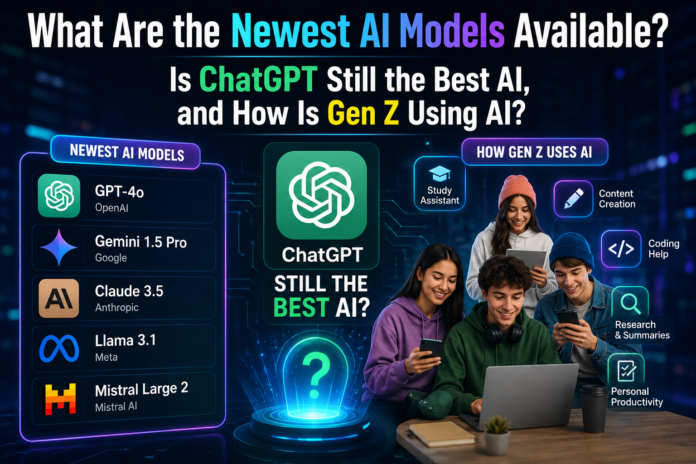
Artificial intelligence is evolving rapidly, transforming how people work, study, communicate, create content, and solve everyday problems. Modern AI tools can write articles, generate images, analyze documents, assist with programming, summarize lengthy reports, and support complex research tasks. As new models emerge, users increasingly want to know which AI systems are the most advanced and which ones offer the best results.
Three questions are especially important: What are the newest AI models available? Is ChatGPT still the best AI assistant? And how is Generation Z using artificial intelligence in everyday life?
The answers depend on what users need. Some AI models excel at reasoning and coding, while others focus on speed, creative content, research, or multimodal capabilities. Understanding these differences can help individuals and businesses choose the right tools.
What Are the Newest AI Models Available?
The AI industry includes several major developers competing to build more capable and efficient models. OpenAI, Google, Anthropic, Meta, and Mistral AI are among the companies associated with widely used AI systems.
New models and upgraded versions regularly introduce improvements in reasoning, instruction following, software development, image understanding, and automated workflows. However, the newest model is not automatically the best choice for every task.
1. OpenAI GPT Models
OpenAI’s GPT models power ChatGPT and support a wide range of professional and personal tasks. Depending on the version and available features, these models can help users write, summarize information, analyze data, generate code, understand images, and work through complicated questions.
One of their main advantages is versatility. A student can use an AI assistant to understand a difficult concept, while a marketer can develop campaign ideas, prepare content outlines, or analyze customer feedback.
Developers can also use GPT models to explain programming concepts, identify potential bugs, and assist with software development. More advanced tools can support workflows involving files, connected applications, and computer interactions.
When comparing the latest GPT releases, users should examine reasoning quality, coding performance, response speed, context length, available tools, and pricing. Model availability may also differ between ChatGPT subscriptions and the API.
2. Google Gemini Models
Google’s Gemini family is designed for tasks involving language, reasoning, and multiple forms of information. Depending on the specific model and product, Gemini can work with text, images, documents, audio, and other supported inputs.
Gemini is particularly relevant for people who already use Google’s ecosystem. Integration with supported Google services can make it useful for organizing information, drafting documents, researching topics, and improving productivity.
For example, a business professional might use an AI assistant to summarize a report, identify important points in a document, or develop an initial presentation outline.
Google offers different model tiers to address different needs. Larger models may be suitable for demanding reasoning tasks, while lighter versions can offer faster responses and lower operating costs.
Users should compare the capabilities of individual Gemini versions rather than assuming that every model in the family delivers identical results.
3. Anthropic Claude Models
Anthropic’s Claude family is another important option for people who work with long documents, complex writing assignments, coding projects, and detailed analysis.
Claude can be useful when a task requires reviewing large amounts of text, comparing information, improving the structure of a report, or explaining technical material. Depending on the model and available tools, it can also support software development and multi-step workflows.
Writers may appreciate its ability to revise drafts while preserving their intended meaning. Researchers and business teams may use it to organize information and identify important themes in lengthy documents.
Different Claude models are designed to balance capability, speed, and cost. More powerful versions may suit demanding tasks, while faster options can be practical for routine work.
As with any AI assistant, users should verify important facts and review generated content before relying on it.
4. Meta AI and Llama Models
Meta has developed AI products for consumer applications and open-weight model ecosystems. Its AI assistant can help with questions, writing, brainstorming, and other everyday tasks, depending on regional availability and product features.
Meta’s Llama family is especially relevant to developers and organizations interested in running or adapting models within their own technical environments.
Open-weight models can provide more flexibility than a conventional hosted chatbot. Developers may be able to customize supported models, experiment with local deployment, or integrate them into specialized applications, subject to each model’s license and hardware requirements.
However, open-weight does not necessarily mean unrestricted use. Licensing terms, commercial permissions, privacy considerations, and deployment requirements must be checked before implementation.
For businesses that need greater control over their AI infrastructure, these factors can be just as important as raw model performance.
5. Mistral AI Models
Mistral AI develops models for general-purpose assistance, coding, reasoning, and enterprise applications. Its offerings include models designed for different performance and deployment requirements.
Organizations may consider Mistral when they need multilingual capabilities, efficient inference, or options for deploying AI in a particular technical environment.
Developers can evaluate these models for chat applications, document processing, internal knowledge tools, and automation. Their suitability depends on the exact model, its license, language requirements, and the resources available for deployment.
For smaller businesses, the key question is whether a model delivers sufficient accuracy and reliability at an affordable cost.
What Should You Compare Before Choosing an AI Model?
Instead of choosing a model simply because it has recently launched, compare the features that matter for your intended use.
| Feature | Why It Matters |
| Reasoning ability | Helps with complex questions and multi-step tasks |
| Coding performance | Useful for developers and software teams |
| Writing quality | Important for articles, reports, and communication |
| Multimodal support | Determines whether the model can handle images, audio, or other inputs |
| Context length | Affects how much information can be processed at once |
| Speed | Matters for real-time assistance and repetitive tasks |
| Cost | Influences affordability for individuals and businesses |
| Privacy and security | Important when handling confidential information |
| Tool integrations | Determines how well the model fits into existing workflows |
The best AI model is the one that meets your requirements without introducing unnecessary costs or risks.
Is ChatGPT Still the Best AI?
ChatGPT remains a major AI assistant, but whether it is the best depends on the task, the model version, and the alternatives available.
No single AI tool is guaranteed to outperform every competitor in every situation. A model that performs exceptionally well in software development might not be the most convenient option for research, while an assistant integrated with a user’s existing applications may offer greater practical value.
ChatGPT is popular because it combines conversational assistance with a broad range of capabilities. Depending on the model and account features, users may be able to work with text, images, files, data, and connected tools in one place.
Why ChatGPT Remains a Strong Option
1. Versatility
ChatGPT can assist with many different activities, including brainstorming, writing, summarization, explanations, planning, and programming. This makes it useful for students, freelancers, professionals, and business owners.
2. Content Creation
Writers and marketers can use ChatGPT to generate outlines, develop article drafts, improve readability, create social media content, and adapt messages for different audiences.
For SEO professionals, it can help organize keyword research, build content briefs, suggest title variations, and prepare initial drafts. However, search intent, factual accuracy, originality, and editorial quality still require human judgment.
3. Coding Assistance
Developers can use ChatGPT to explain code, troubleshoot errors, write tests, and explore possible solutions. Its effectiveness depends on the model, the programming language, and the complexity of the project.
Generated code should always be reviewed and tested before being used in production.
4. Learning and Problem-Solving
ChatGPT can explain difficult subjects in simpler language, provide examples, and adjust explanations to different experience levels. This can make it useful for independent learning.
However, an explanation that sounds convincing may still contain errors. Students should use trustworthy educational materials to verify important information.
5. Productivity and Workflow Support
AI assistants can reduce the time spent on repetitive tasks, such as summarizing documents, preparing meeting notes, organizing ideas, and drafting routine communications.
When supported integrations are available, these capabilities can become part of a broader workflow rather than remaining isolated chat interactions.
How Does ChatGPT Compare With Other AI Assistants?
The following comparison describes general areas of strength, not a universal ranking. Exact performance varies by model version and product configuration.
| AI Assistant | Potential Strengths | Best Fit |
| ChatGPT | Versatile assistance, writing, analysis, and supported tools | General productivity and mixed tasks |
| Google Gemini | Multimodal work and supported Google ecosystem integrations | Users who work extensively with Google services |
| Anthropic Claude | Long-form writing, document analysis, and coding assistance | Detailed writing and knowledge work |
| Meta AI and Llama | Consumer assistance and flexible open-weight options in the Llama ecosystem | Everyday questions and customized deployments |
| Mistral AI | Efficient models and deployment options across selected offerings | Developers and organizations evaluating alternatives |
These categories are broad. Users should test the current versions against their own tasks before making a final decision.
When Might Another AI Tool Be Better?
Another assistant may be more appropriate when it offers a specific feature that ChatGPT does not provide in the user’s current configuration.
For example, someone who relies heavily on Google Workspace may prefer an assistant with convenient integration into that environment. A developer seeking a self-hosted model might investigate suitable open-weight options. A research-focused user may prioritize source transparency and reliable citations.
Pricing is another important factor. A free version may be sufficient for occasional questions, while a paid plan may be worthwhile for frequent professional use.
So, is ChatGPT still the best AI? It remains one of the strongest general-purpose choices, but the most suitable option depends on your workflow, budget, and the quality of the results you need.
How Is Gen Z Using AI?
Generation Z is growing up in a world where digital platforms, smartphones, online communities, and AI-powered tools increasingly overlap. Young people use artificial intelligence for education, creative projects, entertainment, communication, career preparation, and everyday problem-solving.
Their experiences are diverse. Some use AI regularly for schoolwork or professional projects, while others interact with it mainly through applications and platforms that include AI features.
1. Studying and Homework Assistance
Education is one of the most visible applications of generative AI among young people.
Students can ask AI tools to explain complicated concepts, summarize study materials, generate practice questions, and provide step-by-step explanations of problems.
For example, a student preparing for an examination might ask an AI assistant to explain a scientific concept in simple terms and then create a short quiz to test understanding.
Used appropriately, this can support personalized learning and help students identify topics that need more attention.
However, AI-generated answers can be inaccurate or incomplete. Students should check information against course materials, textbooks, and reliable sources. They must also follow their school’s rules regarding AI-assisted assignments and academic integrity.
2. Creating Social Media Content
Gen Z participates in digital culture through platforms such as TikTok, Instagram, YouTube, and other social networks.
AI tools can help users brainstorm video ideas, draft captions, develop scripts, generate graphics, improve audio, and experiment with different creative styles.
A creator making short educational videos, for example, might use AI to develop a script outline, identify a clear opening hook, and prepare caption variations for different platforms.
These tools can reduce the technical barriers to content creation. However, effective content still depends on originality, audience understanding, storytelling, and consistent quality.
Creators should also disclose AI-generated or manipulated content when platform rules or applicable laws require it.
3. Writing, Editing, and Communication
AI writing assistants can help young people improve grammar, organize ideas, and communicate more clearly.
Students may use them to understand writing mistakes, while job seekers can prepare résumé drafts, cover letters, and interview practice questions. Young professionals can also use AI to prepare presentations and workplace communications.
The most useful approach is to treat AI as an editor or assistant rather than a replacement for personal judgment.
Users should preserve their own voice, ensure that their statements are truthful, and avoid submitting generated work in situations where independent authorship is required.
4. Coding and Learning Technical Skills
AI coding assistants can make programming more accessible to beginners by explaining technical terms, generating example code, and helping users understand error messages.
A young developer might use an AI assistant to build a basic website, learn how an API works, or understand the structure of a small application.
This support can encourage experimentation and help learners move from theory to practical projects.
Nevertheless, copying code without understanding it can create security vulnerabilities and make debugging more difficult. Beginners should study the code, test it, and learn the principles behind the solution.
5. Exploring Careers and Freelancing
AI is also changing how young people prepare for employment and freelance work.
They can use AI tools to research career options, practice interview questions, identify skills required for a role, and improve professional profiles. Freelancers may use them to draft proposals, plan projects, and communicate with clients.
For example, a beginner interested in digital marketing can ask an AI assistant to explain keyword research, create a learning roadmap, or develop a sample content strategy.
AI can help people learn more efficiently, but it does not guarantee employment or business success. Practical experience, communication, reliability, and demonstrable skills remain essential.
6. Entertainment and Personal Creativity
Beyond school and work, young people may use AI to brainstorm stories, create fictional characters, generate images, experiment with music-related tools, or explore interactive experiences.
These activities allow users to test ideas that might otherwise require specialized software or technical knowledge.
AI can also support hobbies such as language learning, creative writing, photography planning, and game development.
As these capabilities expand, the distinction between using technology and creating with technology is becoming less clear.
7. Personal Advice and Everyday Questions
Some young people turn to conversational AI for general advice, planning, and help organizing their thoughts.
They may ask for suggestions about time management, study routines, communication, or personal goals. An AI assistant can offer structured ideas and help users consider different options.
However, AI is not a substitute for trusted relationships or qualified professional support. Sensitive personal information should be shared carefully, and important medical, legal, or financial decisions require appropriate verification and expert guidance.
8. Understanding AI Risks and Digital Responsibility
The growing use of AI also raises important questions about privacy, misinformation, bias, and authenticity.
AI systems can generate false information, reproduce stereotypes, or create convincing but fabricated images and text. Users may also expose private information by uploading confidential documents to services without understanding their data policies.
Young people can reduce these risks by checking claims against reliable sources, reviewing privacy settings, avoiding unnecessary disclosure of personal details, and questioning content that appears suspicious.
Learning to evaluate AI outputs is becoming an important digital skill.
Benefits and Challenges of AI for Gen Z
AI offers opportunities, but its value depends on how it is used.
| Benefits | Challenges |
| Faster access to explanations | Incorrect or misleading answers |
| Support for creative projects | Overreliance on generated content |
| Assistance with coding and digital skills | Reduced learning when users copy without understanding |
| Help with job preparation | Competition as workplace tasks change |
| More accessible productivity tools | Privacy and data-security concerns |
| Support for brainstorming | Bias, misinformation, and authenticity issues |
The goal should not be to avoid AI completely or accept every answer without question. Instead, users should develop the skills needed to use it responsibly and effectively.
How to Choose the Right AI Tool in 2026
With new models appearing and existing products receiving updates, choosing an AI assistant requires more than looking at a release announcement.
First, define the main task. A student may prioritize clear explanations, while a developer may need strong coding support. A business may care more about data controls, integrations, and predictable operating costs.
Second, test the same task across several tools. Compare the accuracy, clarity, speed, and usefulness of their answers. For research tasks, examine whether the assistant provides sources that genuinely support its claims.
Third, review the price and usage limits. A highly capable model may not be necessary for simple daily tasks, while complex work may justify a more advanced option.
Finally, consider privacy. Before uploading business records, client information, or sensitive documents, check the service’s data-handling policies and your organization’s requirements.
The most effective approach is to select tools based on evidence and actual needs rather than popularity alone.
The Future of AI Models and Digital Life
AI development is likely to continue emphasizing reasoning, multimodal interaction, coding, efficiency, and systems that can complete multi-step tasks with appropriate supervision.
As these capabilities improve, AI assistants may become more deeply integrated into education, creative work, software development, customer support, and business operations.
For Gen Z, this shift creates opportunities to learn new skills and develop ideas, but it also increases the importance of critical thinking, digital literacy, and responsible technology use.
Businesses will face similar challenges. They must determine where AI improves productivity, where human expertise remains essential, and how to protect information while using automated systems.
The long-term winners will not necessarily be those who use the largest number of AI tools. They will be the people and organizations that understand their strengths, recognize their limitations, and apply them to meaningful problems.
Conclusion
The newest AI models offer increasingly capable ways to write, research, code, analyze information, and automate tasks. OpenAI, Google, Anthropic, Meta, and Mistral AI each provide options worth evaluating, although their capabilities and availability differ across individual models and products.
ChatGPT remains a strong general-purpose AI assistant, but it is not automatically the best choice for every user. Gemini, Claude, Meta’s AI offerings, and Mistral’s models may be better suited to particular workflows or technical requirements.
Meanwhile, Gen Z is using AI for studying, social media, creative work, coding, career preparation, and everyday questions. These applications can make technology more accessible, provided users remain aware of privacy risks, misinformation, and the importance of independent thinking.
Ultimately, choosing the right AI model is about more than finding the newest release. It is about identifying a tool that delivers reliable results, fits your budget, and helps you accomplish your goals responsibly.
Frequently Asked Questions
What are the newest AI models available?
Major AI developers, including OpenAI, Google, Anthropic, Meta, and Mistral AI, continue to release and update their model families. The newest available versions should be confirmed through their official announcements and product documentation.
Is ChatGPT still the best AI?
ChatGPT remains a leading general-purpose AI assistant, but the best choice depends on the task. Users should compare current models for accuracy, reasoning, writing, coding, integrations, privacy, and cost.
Which AI is best for coding?
ChatGPT, Claude, Gemini, and selected Mistral or open-weight models can all assist with programming. The best option depends on the programming task, model version, development environment, and budget.
How is Gen Z using AI?
Gen Z uses AI for studying, writing, social media content, coding, career preparation, creative projects, and everyday problem-solving. Usage patterns vary among individuals and communities.
Can AI replace human creativity?
AI can support brainstorming and content production, but human creativity involves personal experience, judgment, cultural understanding, and original intent. AI is generally most useful when people actively guide and review its output.
Is it safe to use AI tools?
AI tools can be useful, but users should verify important information, avoid sharing unnecessary sensitive data, and review privacy policies. They should also follow relevant academic, workplace, and platform rules.
How can businesses benefit from AI?
Businesses can use AI to assist with content development, customer support, document analysis, software development, and repetitive workflows. Results depend on implementation quality, oversight, data protection, and the suitability of the selected model.

