
Introduction
In today’s digital world, cyber threats evolve rapidly. Therefore, robust protection is essential for everyone. Malwarebytes Anti-Malware, commonly known in tech forums as mbam software, stands out as a trusted solution. It excels at detecting and removing malware that often evades traditional antivirus programs.
Founded in 2006, Malwarebytes started as a specialized tool against spyware and adware. However, it has since grown into a comprehensive cybersecurity suite. Now, it serves millions of users worldwide, from individuals to families and small businesses.
Moreover, the company incorporates cutting-edge AI and machine learning. These technologies help it anticipate and neutralize emerging threats. In 2025, independent testers like AVLab Cybersecurity Foundation awarded it Product of the Year. This recognition highlights its superior performance in real-world malware detection.
This detailed article explores the core elements of mbam software. First, we examine its innovative features. Next, we break down the latest pricing plans. Finally, we cover system requirements across platforms. By the end, you’ll understand why this tool remains a top choice for secure online experiences.

Key Features of MBAM Software
Real-Time Protection and Malware Detection
Cybersecurity relies on proactive defenses. Consequently, mbam software delivers multi-layered real-time protection. It continuously scans for threats, blocking them before they inflict damage.
Powered by advanced AI, the engine analyzes behavioral patterns. For instance, it flags unusual file modifications or suspicious network activity. Unlike signature-only tools, it uses heuristics to identify zero-day exploits.
Additionally, ransomware protection is robust. If malicious encryption attempts occur, the system isolates the threat instantly. Users often recover files without paying ransoms, thanks to this quick intervention.
Browser and Web Security
Online browsing exposes users to many risks. However, Browser Guard changes that. This free extension works with major browsers like Chrome, Firefox, and Edge.
It blocks phishing sites, malicious ads, and trackers effectively. As a result, privacy improves significantly. Independent reports show it prevents millions of web threats monthly.
Furthermore, in 2025, enhanced web protection on Mac adds device-level safeguards. This counters AI-powered scams and botnets more efficiently.
Mobile-Specific Tools
Mobile devices face unique vulnerabilities. Therefore, the Android and iOS apps provide tailored defenses.
On Android, scans detect hidden malware in apps. They also check for system weaknesses. Meanwhile, the iOS version emphasizes privacy, with data breach alerts.
A standout 2025 addition is Scam Guard. This AI companion analyzes suspicious messages, links, or screenshots. It offers immediate advice, helping users avoid fraud in real time.
Privacy and Identity Safeguards
Higher-tier plans include powerful privacy tools. For example, the high-speed VPN uses WireGuard protocol. It ensures no-log encryption and unlimited data across numerous servers.
Additionally, identity protection monitors the dark web. Alerts arrive if personal data leaks. Plans offer up to $2 million in insurance, plus recovery support.
Another new feature is Personal Data Remover. Available in select regions like the US, it scans and requests deletion of public info from brokers.
User Interface and Customization
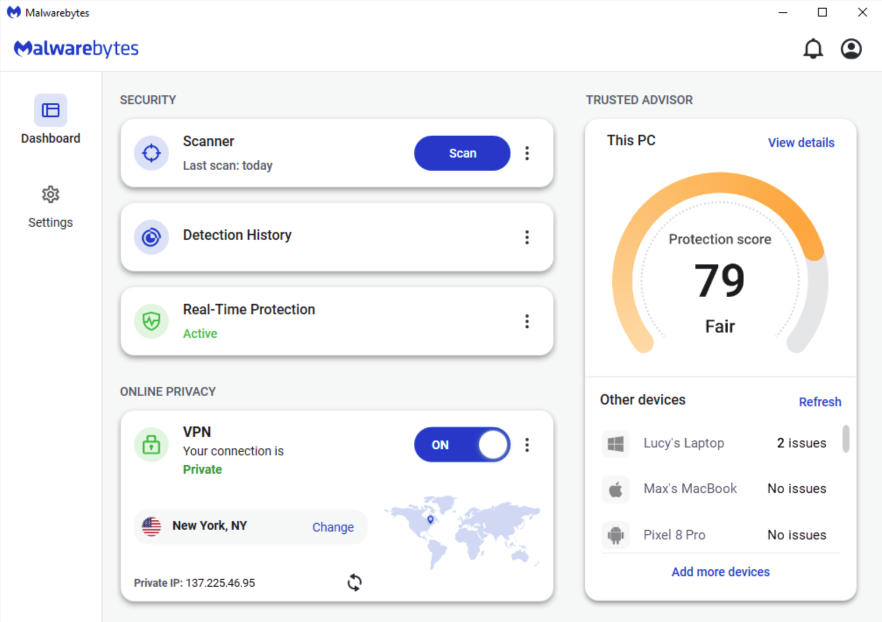
Ease of use matters greatly. Thus, the dashboard remains intuitive and clean. It displays threat history, device status, and recommendations clearly.
Users can schedule scans easily. They also exclude files or adjust settings. For gamers, play mode minimizes interruptions.
In Windows, the new Firewall Control simplifies managing connections. It blocks inbound traffic by default and eases outbound rules.
Moreover, free Malwarebytes Tools in 2025 help optimize performance. These include cleanup utilities for faster devices.
Additional Enhancements in 2025
Recent updates focus on Mac users too. The enhanced scan engine digs deeper, targeting infostealers and advanced threats without slowing systems.
Overall, these features combine prevention, detection, and recovery. As threats advance, mbam software adapts swiftly, earning consistent praise for low false positives and lightweight operation.
Pricing Options and Plans
Why Pricing Matters
Choosing security involves balancing cost and coverage. Fortunately, Malwarebytes offers flexible, people-focused plans in 2025. They shifted from device counts to household protection, making it more affordable.
All subscriptions include a 60-day money-back guarantee. Plus, customer support is free.
Plus Plan Details
The Plus plan starts strong. Priced at $79.99 per year, it covers 3 devices.
Key inclusions are Premium Security for multi-platform threat blocking. Browser Guard handles web scams. Additionally, the Privacy VPN provides secure, unrestricted browsing.
Promotions often offer 50% discounts for new users.
Ultimate Plan for Individuals
For comprehensive needs, the Ultimate plan costs $139.99 annually (down from $279.99). It protects 1 adult and 3 devices.
Building on Plus, it adds full Identity Protection. Features include dark web monitoring, credit alerts, and $2 million insurance. Personal Data Remover is also included.
Family-Oriented Plans
Families benefit from scaled options. Standard Family covers 10 devices at $119.99 per year. It focuses on core security and Browser Guard.
Next, Plus Family adds VPN for $149.99 yearly, still on 10 devices.
Finally, Ultimate Family is $199.99 (from $399.99). It safeguards 2 adults, 10 children, and 10 devices. Identity coverage extends family-wide.
Value and Comparisons
These prices reflect 2025 simplifications. For example, bundling VPN and identity tools saves compared to separate services.
Free versions allow manual scans. However, premium unlocks real-time features essential for ongoing safety.
Discounts appear for students, military, or multi-year commitments. In summary, the structure ensures scalability. You pay for relevant protection, delivering excellent value against evolving risks.
System Requirements
Desktop Compatibility
Running smoothly requires compatible hardware. Luckily, requirements remain modest in 2025.
For Windows, support covers versions 10 and 11 primarily. Older ones like 7 may work with limitations.
Minimums include a compatible processor, 4 GB RAM (8 GB recommended), and ample storage. Internet connection is vital for updates.
On macOS, it supports Big Sur (11) and later, including the newest releases. Apple Silicon and Intel chips are both optimized.
Mobile and Other Platforms
Android needs version 9 or higher. Mid-range devices handle it well, with low resource use.
iOS requires version 14 onward. Features adapt to Apple’s restrictions, focusing on privacy.
Browser extensions need only modern browsers. ChromeOS compatibility is broad too.
Performance Considerations
Installation is quick and straightforward. The software auto-adjusts to your setup.
On lower-spec machines, customize scans to conserve resources. Tests confirm minimal idle RAM usage, ensuring no noticeable slowdowns.
Thus, accessibility is high across ecosystems.
FAQ
What distinguishes free from premium versions? The free tool offers on-demand scans and removal. However, premium adds real-time protection, VPN, and identity features for constant defense.
How many devices can one plan cover? It varies. Plus handles 3, while family plans reach 10 devices and multiple people.
Is a VPN included? Yes, in Plus and Ultimate tiers. It features fast speeds and strict no-logging.
What happens with stubborn threats? High detection rates prevail. Additionally, support assists premium users.
Is there a refund policy? Absolutely—60 days for all plans.
How frequent are updates? Threat databases refresh multiple times daily. Major enhancements roll out regularly.
Does it impact performance? No. It’s lightweight by design.
Can it stop ransomware? Yes, with specialized real-time blocking.
Is identity protection global? Monitoring is worldwide, though data removal is region-specific currently.
How to install? Download officially, then follow simple prompts.
Conclusion
In conclusion, Malwarebytes Anti-Malware—widely called mbam software—excels in 2025’s threat landscape. Its advanced features, simplified pricing, and broad compatibility make it indispensable.
From AI-driven scans to family identity safeguards, it empowers safe digital living. As cyber risks grow, tools like this provide essential confidence.